.
Showing posts with label Cracking. Show all posts

Sunday, 12 May 2013

HOW TO HIDE YOUR NUMBER WHILE SENDING MESSAGE (NOT WHILE CALLING) AND HOW TO MANUALLY SEND CUSTOMISED SMS WITH YOUR MOBILE PHONE

HOW TO HIDE YOUR NUMBER WHILE SENDING MESSAGE (NOT WHILE CALLING) AND HOW TO MANUALLY SEND CUSTOMISED SMS WITH YOUR MOBILE PHONE

Do you know you can hide your number i.e not visible for your recipient...its is realy simple infact the simplest method... I have tried it many times without letter...Follow me pls... Step1.supposing that you are sending sms to a number 08122961062 (that my number...but dont test it with it) goto message>settings>text message>sms sending profile>send sms as set send sms option to "EMAIL" Step2.you are immediately asked for sms server....put the number "081229610624" Step3.save it and activate it as well Step4.goto create new sms then click send...you will be asked for your email address...put this without quotes "PQR @ ABC" where 'PQR' & 'ABC' is anything you want. you can also put URE email address Step5.click sendUre done your recipiect will recieve message from "PQR @ ABC" without your number...your number can neve be found by the reciepent....

HOW TO TRANSFER MB ON YOUR ETISALAT AND AIRTEL SIM trusted and tested CLICK AND SEE..................

HOW TO TRANSFER MB ON YOUR ETISALAT AND AIRTEL SIM trusted and tested CLICK AND SEE..................


[b]Etisalat How To Transfer Megabites On Your Etisalat Line[/b] For you To transfer MB on etisalat network it doesn’t necessary for you to migrate from the current tariff which you are all what you need is to just follow the following steps and that’s all.
*229*recepient*Amount Of MB then followed by # *229*08099999999*50#

OR


*229*recepient*Amount Of MB *pin#
*229*08099999999*50*pin# Default Security Pin is=0000 After doing this, the total MB you specified will be transfered to the number you entered.
[b]How To Transfer Megabites On Your Airtel Line[/b]

To transfer airtel MB, follow the below steps. To Transfer 10MB:
  • dial *141*712*11*recipent#
  • To Transfer 25MB: dial *141*712*9*recipent#
  • To Transfer 60MB: dial *141*712*4*recipent#.
Note: Airtel will deduct #100 or 10MB from your line immediately you transfer the MB to learn more about dial 141 and follow the voice prompts or you can call airtel customer care on 111 That’s All…! MAKE SURE YOU  FOR MORE HOTTEST TUTORIALS AND FREE CALL CODE e.t.c

Saturday, 11 May 2013

CONFERENCE, REMOTE AND SHARE FILES USING MOBILE


Have you ever wondered how you could connect two computers and share files from another computer far away from your location with yours? for example, you have a friend in Germany whom you want to access his computer here in Nigeria like it was your own computer placed in front of you, or lets say you're able to See through another man's computer like a mirror and at the same time mess around with files and folders on his computer? (sounds like someone is joking huh?).

Okay come to think of it, how about conferencing a couple of friends computer together so that you all have cool access to one another's files and document irrespective of each other proximity.

Well, after a well spent weekend I just decided to drop this very cool tutorial. I will be showing you how you can connect, share, conference and remote control between computers and mobile gadget in this little tutorial. And one of the possible ways to do this is through the use Team Viewer application

Team Viewer is a proprietary computer software package for remote control, desktop sharing, online meetings, web conferencing and file transfer between computers.

The software is available for different operating system like Windows, Linux (Ubuntu), Apple i OS, and Android

To get started, First download the team viewer app.


* Installation (remote PC) Install TeamViewer Software by following the instructions given by installation wizard and launch TeamViewer. Click on the
"Connection" tab at the top of the TeamViewer window and select "Setup unattended access ...".
* Follow this Configuration guide ( For remote PC) You should first step set a computer name and password for the remote computer. In the second step you can add this remote
computer to your computers & contacts list (refer to "TeamViewer - Use the Computers & Contacts List").
* Connection Open your computers & contacts list and right-click on the computer name you would like to connect with. Choose the connection mode „Remote control (using password)“ and enter your individual password (from step 2) in the following dialog box in order to establish a connection.
PC Access From Your Mobile Device

1. Download TeamViewer full version and start the software. Record the unique ID and the password. Tip: Read the document "Team Viewer - Setup Unattended Access" to learn how to configure TeamViewer for permanent access.

2. On your mobile device Install and start the compatible Team Viewer App. Find further information and all apps at: www.teamviewer.com/mobile

3. Connection

From your mobile device, enter the ID and password of the remote computer (from step 1) and control your computer as if you were sitting right in front of it.

10 STEPS TO TROUBLESHOOT YOUR ZTE OR HUAWEI MODEM


Due to the large number of complains I get on countless occasion from different modem users, I have decided to make this post that can help you fix some bug and troubleshoot your modem. There are several reasons why you re unable to connect your modem to your PC to access the internet. some many have complained of "device disconnected" or device not available when they try to connect their modem to the internet. Sometimes SIM is not detected or SIM is said to be invalid. And sometimes you get the message on modem installation that says "Device not successfully install" or you get device "driver not found".

Now the One million dollar question is; how are you to go about this? how do yo get alll these solve to get your modem in a working condition.Should I get a new modem in this case?


Now before You think of getting a new modem, try the following steps carefully and make sure you hid to every instruction.


[1] 1ST MAKE SURE THE SIM IS PROPERLY INSERTED

You should probably see direction for use on your modem pack or right on the modem that shows you the correct way to insert SIM into your modem
[2] MAKE SURE YOUR MODEM IS UNLOCKED OR YOU'RE USING THE RIGHT SIM With the advent of Customized Modem from different network provider, you're are sure to get an error message that shows SIM is not accepted when you insert SIM from another network provider. You can get passed this by simply getting your Modem unlocked so it can accept SIM from other network provider.
[3] MAKE SURE U USE THE APPROPRIATE APN SETTINGS FOR YOUR HUAWEI OR ZTE DEVICE

Make sure you create a profile on your modem bearing the right APN settings for the right SIM inserted. You can create several profile as much as you please. APN Settings for Glo APN: gloflat username: web (or leave blank) passord: web (or leave blank) access number: *99#

APN Settings for Airtel APN: internet.ng.airtel.com username: web (or leave blank) passord: web (or leave blank) access number: *99# (similar to the settings for BIS on PC )

APN Settings for MTN APN:web.gprs.mtnnigeria.net username: web (or leave blank) passord: web (or leave blank) access number: *99#


APN Settings for Etisalat APN: etisalat username: web (or leave blank) passord: web (or leave blank) access number: *99#
[4] TRY REINSTALLING THE SOFTWARE OR DASHBOARD IN SAFE MODE You can kindly unistall the modem software (dashboard) and try re-installing it in a Safe Mode (...I guess you're already know how to do this ).It's as simple as holding or taping F8 on your PC before window loads... just as soon as you press the power button or press F1 on our desktop and type Safe mode to search for more info)
[5] MAKE SURE YOUR FIREWALL IS NOT BLOCKING YOUR MODEM SOFTWARE TO CONNECT DIRECTLY TO THE INTERNET You should also make sure that your firewall is not preventing internet connect from your device. You can do a proper check and try connecting again.
[6] MAKE SURE YOU HAVE A DATA PLAN THAT IS ACTIVE FROM EITHER GLO, ETISALAT, MTN, OR AIRTEL E.T.C Getting a data plan of your choice should not be your problem, 'cus all through this blog, I have littered and exhausted i know about available data plan on all network.
# I guess you should Check:Glo Recent Data Plan
# Aitel BIs Data Plan On PC
# Etisalat Data Plan for BIS
# Mtn New Data Plan With Extensive Validity
[7] THEN YOU CAN TRY OTHER SIMS TO CHECK IF IT IS SIM PROBLEM. NOT ALL SIMS CAN BROWSE Yes, Its true, not all SIM can browse no matter what you do to that SIM. All SIMs are made differently
[8] CHECK IF MORE THAN ONE MODEM IS INSTALLED ON YOUR SYSTEM AND DELETE THE ONES YOU DON'T NEED. It has happened to me. I installed several modems on my PC. When I tried connecting it says "device disconnected", when I uninstalled all the modems, I installed only one and it started working. I noticed also that, it also work on USB ports and doesn't work on the other. But after the above step, it all got solved.You can uninstalled them from your control panel through uninstallation.
[9] YOU CAN RESTART YOUR SYSTEM AND TRY CONNECTING ONCE AGAIN.

If you've done the above steps, then you can quickly do a restart so as to beginning connection on a fresh note
[10] FINALLY YOU CAN EITHER FLASH AND RE-INSTALL THE MODEM FIRMWARE OR DO AN UPDATE. You should do this if only the above mentioned steps proved abortive. This very steps helps you to flash, re-install and update to your modem's firmware and Dashbord. This is the final antidote to any stubborn modem.

You can click the like button if deem this Post helpful

THANKS

REMOTE YOUR MAC WITH YOUR ADROID DEVICE


At exactly one week ago a go I posted how to remote control and conference your pc with a mobile phone installed with Teamvier application.

Today i thinks this very post is a bit different. or let me say it is the same only that you won't be need a third party programme or software to remote your MAc pc. All you need this time is a Mac Remote app for your Android phone or tablet is just the right tool we're going to use to do the magic.


HOw it Works


Remoting your pc with app on mobile is nothing new and has never been anything more than installing a server side application that helps you to handle commands from a device which serves as a control to a remote computer.

The main thing you have to know here is, your MAC computer works over SSH. As a User, you just need to enable remote logins for your machine, and the app walks them through wizard as a guide.

With this, it enables media playback on your MAC computer using your android In a simple way, you will have a remote control in your hand, without needing to install additional programs on your computer. You will be able to watch movies without getting off the couch! Get the app Here Now With this application you will be able to control the followings media players in an individually way
- VLC
- itunes
- Iphoto
- Spotify
- Quicktime
- MplayerX
- Preview
- PowerPoint
-Keynote
Also you will be able to shutdown, suspend and adjust brightness and volume! Everything remotely!

Posted by PRINCEKING WONODI Email ThisBlogThis!Share to TwitterShare to Facebook

ETISALAT MANUAL CONFIGURATION AND MMS SETTINGS


This is just a full review of all the post concerning Etisalat configuration setting. For those that were unable to configure their phone automatically, you can stick to the below options and steps to get it done. The settings below include manual configuration settings and MMS settings for your Etisalat SIM Etisalat Data Service Settings for Handsets

Etisalat Internet COnfiguration Code
Account Name Etisalat Ng
Acess Point Name (APN) Etisalat
Username Leave it Blank
Password Leave it Blank
Home Page http://mobile.etisalat.com.ng ------- -------


ETISALAT WAP/GPRS SETTINGS:
Etisalat WAP COnfiguration Code
Account Name Etisalat Ng
Acess Point Name (APN) Etisalat
Username Leave it Blank
Password Leave it Blank
Port 8080
IP Adress 10.71.170.5


ETISALAT MMS CONFIGURATION
Etisalat MMS COnfiguration Code
Account Name Etisalat MMS
Acess Point Name (APN) Etisalat
Username Leave it Blank
Password Leave it Blank
Port 8080
MMS Gateway IP Address 10.71.170.5
MMS Gateway URL/Home http://10.71.170.30:38090/was ENJOY

HOW TO PORT YOUR PHONE NUMBER TO ANY NETWORK OPERATOR IN NIGERIA


Mobile Number Portability

is a service that allows you as a mobile network subscriber to keep your mobile phone number when changing from one Mobile Network sevice to another. For example you can from MTN to Etisalat, Glo, Airtel e.tc without altering your phone number and its available to both prepared and post paid subscribers with different network operator as in Nigeria. once you port the old sIM becomes useless and invalid and you will need a new SIM in replacement. Etisalat MNP has started since 22nd April, 2013

WHY YOU MAY NEED number porting (MNP)


# It will avail you that ample opportunity of keeping your unique phone number while switching to another network of your choice
# Saves you the stress of getting your buddies alerted whenever you decided to change a network operator.


# what services Can I get from Porting from one network to the other

For example, if you have to port from Etisalat to MTN, then you you are sure to have acess to all MTN services such as 3g/GPRS/MMS/sms services and also a personalized customer care with your etisalat ported to MTN. The Most interesting thing to know here is PORTING is free, and you can easily port from whichever SIM to the other. Once you port you will loose hold of all services available on your old SIM Note this before you Port that SIM. You have to back up all contacts saved on your current SIM before going ahead. Don't also forget to do away with all the airtime available on your current SIM or your Data plan as the case may be.Also note that if you're are using a network specific phone to Port, make sure it is unlocked by that Netowrk operator before going ahead.

HOW TO PORT YOUR MOBILE NUMBER

Just visit any of Your Network Operator Service Center and Request for MNP form to port your number as simple as that.

OR To port to MTN send an SMS with the word PORT to the short code 3232. your request will be granted after MNP CRDB validation. You may be asked which number you want to "Port to" The name of your current Netork Provider. Your "ASL" e.t.c (age, Sex, Location). You should recieve a free SIM from your new network Provider.

You can click here to get a form if you are an Etisalat Subscriber or call this helpline08091234000

HOW LONG DOES IS TAKE TO PORT A NUMBER


well this depends on the netowrk operator you are dealing with. for Mtn Users porting can be just for about Six hours before it's been validated. I dont know much about other network but i know for sure it would be less than 48hrs

HOW TO CANCEL NUMBER PORTING REQUEST

Too Bad, you cant cancel a number porting request. Once the message is sent, you just have to let go So just think before you go ahead. But you can port back to your old number 90 Days after your request. or you can forward complains to your network provider for Emergency Repartration if possible

QUALIFICATION FOR NUMBER PORTING (MNP)

You must provide a proof of identity before porting that nuber. You must not be reported to have been stolen. Just to avoid cases of fraud. You must have registered your Phone number also. You existing number must have been Valid and active before you can Port.

WHAT YOU NEVER KNEW ABOUT YOUR IMEI NUMBER


Does My IMEI Number Mean Anything

Yes it really means a lot if you dont know. Is too Bad that most NIGERIANS and many others out there don't know sincerely the significance of their IMEI number. They see it more often as a mere number that comes along with the goody bag. The only few who knows little about it erroneously thinks that the first five or six numbers are just encoded representation of the location where the phone was manufactured and assert it to it as being a predisposing factor to low quality product that comes from such location.

Lets get it straight here. know that the location of the manufacturer is not encoded into your mobile phone IMEI number, the funny thing here is that, Not even your phone manufacturer assigns IMEI number.Most of these mobile phone manufacturer receive IMEI numbers from external regulatory body.

THEORETHICAL EXPLANATION OF YOUR IMEI NUMBER Theoretically the first two(2) digits ***(..i.e. 35) represent the National Association or regulatory body that assigns the IMEI number, though in practice the worldwide GSM Association now issues all IMEIs and shows the British Approvals Board of Telecommunications, though all IMEIs in the world currently begin 35... The details that accounts for all IMEIs ever since 1st -Jan- 2004 are as follows: The next six digits discloses the device type for example, 640602 is a Nokia N96, 808201 is a Nokia N82;etc.) - this together with the first two numbers are called the Type Allocation Code (TAC). The rest six digits are unique serial number assigned to a particular device and are commonly known as "check-digit". No two mobile phones have the same Check digit.

And So...

And so also take note that, not all N96s have that IMEI series, high-volume sellers might move to a new IMEI series when one is exhausted, or the manufacturer could have different device variants using different IMEI series (such as N95-1, N95-2, N95-3...).(does that makes some sense to you?...)

Back then when mobile phones started making trends in communication it was very common and likely for an IMEI number to have seventeen digits, the last two digits probably encoded as "software version" - right now things have changed since there is a constant change of software version can be updated, even before we could update our phones ourselves.

This is a useful page for information on IMEI numbers:

You can check here for more http://www.gsm-security.net/faq/imei-international-mobile-equipment-identity-gsm.html

Friday, 10 May 2013

UNLOCK THAT STUBBORN ZTE AND HUAWEI MODEM HERE

follow this guide line to unlock your Huawei Modem Easily I know you must have been frustrated after several attempts to unlock your new Huawei modem probably because generating the unlock code using IMEI doesn’t seem to work for you like it used to. Well, the newer versions of Huawei modems like E303 and E173 doesn’t seem to respond to that old trick any more. It also doesn’t show you where to put the unlock code for your E173 modem when you insert SIM from other network provider. I also had the same experience and made several attempts too, but all to no avail. Suddenly, I had a brain wave and decided to try the popular DC-unlocker .And guess what? Voila!!! it finally got unlocked. You can Download the latest version here. Follow this easy tutorial on how to unlock stubborn Huawei and Zte to enjoy a wonderful browsing experience with any network of your choice.
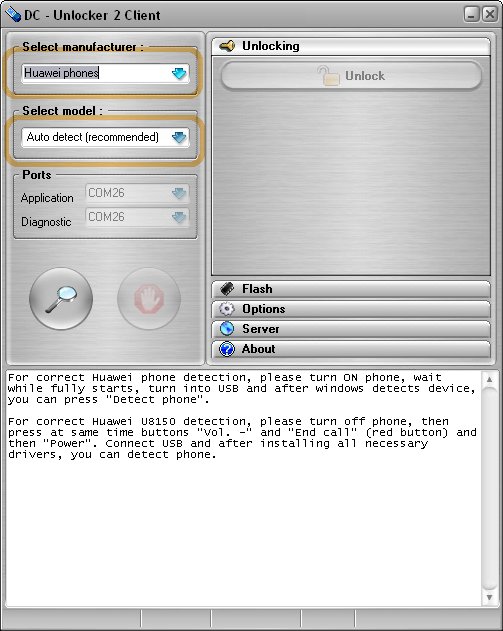
This tutorial will help you unlock the following model of modem: ZTE MF190(Telma Madagascar), ZTE MF633, Huawei E177 (Zain Sudan,Huawei E153 (MTN Sudan),Huawei E173 (Safaricom Kenya), Huawei E303 (Sudani Sudan), Huawei E173 (Airtel Nigeria), Huawei E3231 HiLink, Huawei SoftBank 005HW, Huawei SoftBank AP01HW,Huwei E1750, Huawei E153u1 (Etisalat Egypt), Huawei E153 (Philippines SmartBro), ZTE MF627 (Philippines)

The first you should know is that you need some amount of credit on your DC- unlocker to unlock your device. Don’t be carried away by that crappy stuff regarded as a cracked version of DC-unlocker. You must buy sufficient credit before you can unlock any stubborn modem. The credit varies depending on the device you want to unlock. You can check out the price list from this link For Huawei E303, it’s only 4 credits while E173 requires 7 credits. Related Post:


* UNLOCK AND INSTALL HUAWEI or ZTE FIRMWARE AND DASHBOARD (MUST READ)
* HOW TO USE YOUR IPHONE AS A 3G MODEM
* HOW TO INSTALL GLO BOLT MODEM
* HOW TO USE YOUR BLACKBERRY AS A MODEM
* HOW TO CONNECT YOUR NOKIA PHONE AS A MODEM

Step 1: Now, let me assume you just got some sufficient credit to your account. Click here - Connect your modem and run the software. Be sure you close the default dashboard software for your modem.

- Quickly Select your device manufacturer (e.g Huawei or Zte) from the drop-down menu and find your device model from the ‘select model’ section
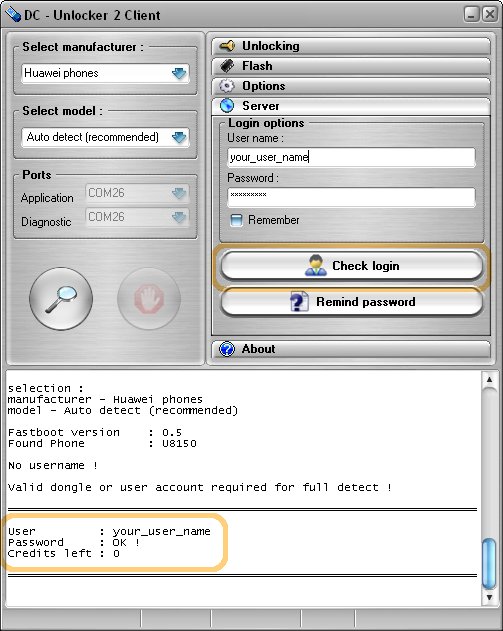


- Or you can click on the magnifying glass icon to enable the DC-unlocker software to automatically search and detect your device.

- It normally takes few second for the software to detect your modem automatically. See the photo below to learn more

Step 2: Now switch over to the right pane of the unlocker and click on Server and fill out the “login options” text box. Fill it with your username and password, click on check login. Dc-unlocker user name and password is created upon purchase of sufficient credit. You can do that with your PayPal account or via credit card

Step3: Hit the “Do job” button and enjoy unrestricted SIM usage on your Zte and Huawei modem You can check out the photo below to see a proof that your stubborn Huawei modem has been unlocked successfully (It works for Zte also)
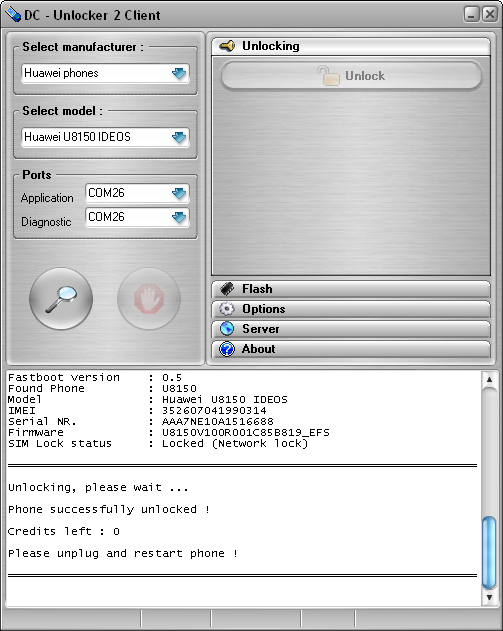
Note: You much have a sufficient balance or credit before you can successfully unlock your modem You can just drop a ‘thank you’ comment, after unlocking your modem with these 3 easy steps above. You can check this link to see list of D-unlocker distributors in your country or near your locality. For those of you who don’t have a PayPal account, you can contact me (publicpkg @yahoo.com) and I will carry out the purchase for you, else you can drop your testimony via comment box below

How to send friend request on facebook when you are blocked from the service

In this tutorial, i would be explaining three different ways on how to do it on a separate devices.

[ java phone, symbian phone, Desktop/Laptop ]
→Firstly,
JAVA PHONE

♣. You'll need an application called Moby explorer,[download it]

♣. Lunch it, allow the application to read all your device datas

♣. Open any folder, press menu, the menu would pull up, locate Text Editor, New, Empty file... Ok

♣. Menu again, edit.[ write the email of the users you needs as much as possible and separate them with coma sign <,,,,,> e.g yourfriend@yahoo.com,anotherfriend@gmail.com,unknownfriend@hotmail.com, e.t.c, when you are done, press Ok

♣. Press menu again, then click on Save As.. Now save it as contact.vcf

♣. Quit your moby explorer and lunch your browser(opera or ucweb), then login to your facebook account, then upload your Contact.
vcf It'll ask you to send friend request, press OK. It works 100%.

→Secondly,
For Symbian Phone

♣. Open your File X-plore .sis or .sisx or .zip Locate where you want to create new document(either phone memory or external memory card)

♣. Press menu, then file, scroll down to where you have New Text File

♣. Type your friend's email in it

♣. Save it as friendz email.vcf

♣. Goto facebook, then upload it.

→Thirdly, For Desktop/Laptop

♣. Open a New text document (.txt) in Notepad

♣. Add all the email addresses separated by coma ( ,,, )

♣. Now save that file with the extension .vcf

♣. This new file is your contact file. Upload it to Facebook and you will be prompted to send friend request. Click 'OK'.